Average daily spending: how much can you spend per day?
See your average daily spending in ReceiptStorm, compare it with last month, and find out how much you can spend per day until the end of the month.
In this guide
Your average daily spending is on the Home tab in ReceiptStorm: the Average per day card divides what you've bought this month by the days of the month so far. Set a monthly budget and the Available per day row on the same card tells you how much you can spend per day until the end of the month, after the bills you still have to pay. The card is free on every plan.
Where to find your average daily spending
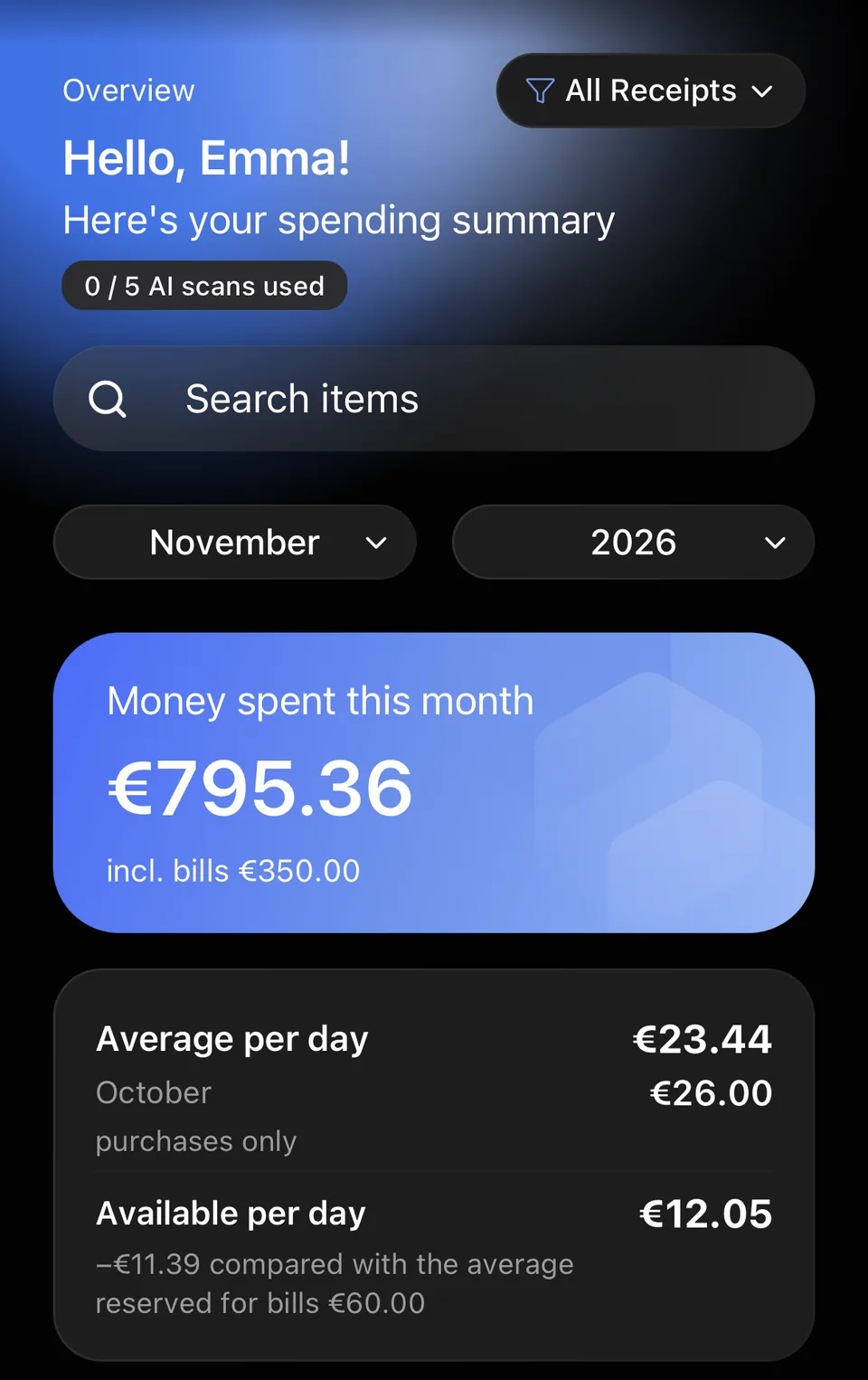
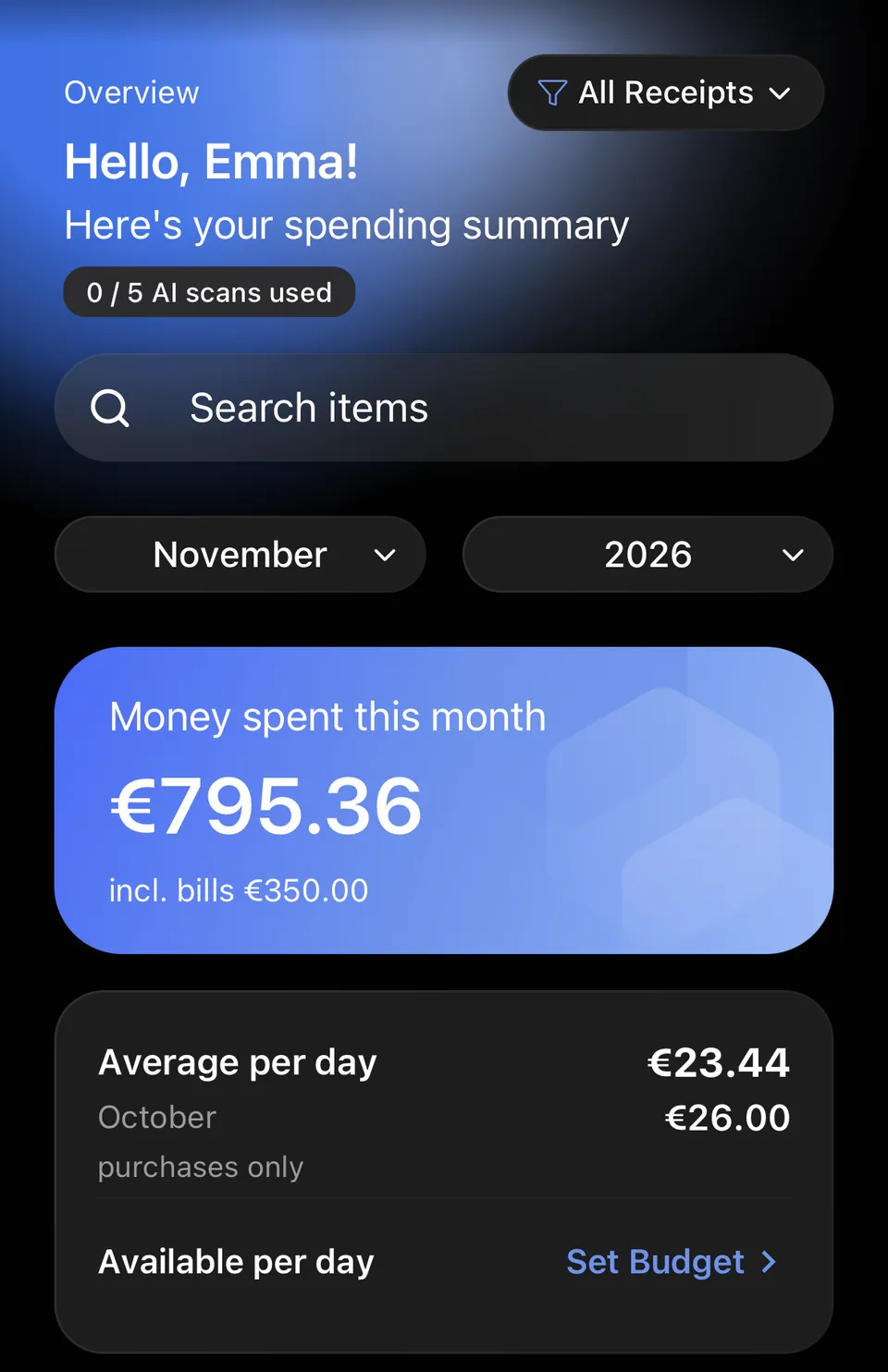
The Average per day card sits on Home, directly under Money spent this month and above Cash flow, and it always follows the month picked at the top of the screen. The screenshot at the top of this guide shows Emma's Home on November 19: she has spent €795.36 so far, €350.00 of it on bills, and the card turns that into amounts per day.
| Row | What it shows | When you see it |
|---|---|---|
| Average per day | The selected month's purchases divided by the days counted | Whenever the card is shown |
| The name of last month, such as October | Last month's purchases divided by the days of that month | While the current month is selected, if you bought something last month |
| purchases only | A tag: bill payments were left out of the averages above it | When one of the two months has bill payments |
| Available per day | What your Overall budget still allows per day until the month ends | Current month and All Receipts: an amount once the month has an Overall budget, the Set Budget link until then |
| −€11.39 compared with the average | Available per day minus Average per day | From the 7th day counted, once you've bought something |
| reserved for bills €60.00 | The unpaid bills set aside before the daily amount is worked out | When bills that count in your spending are still unpaid |
How the average per day is calculated
Average per day is your purchases this month divided by the days of the month so far. Purchases are everything you saved for the month except bill payments: the total under Money spent this month minus the line below it, incl. bills €350.00 in Emma's case. The days are calendar days, so days without any spending count too, and today counts: on November 19 the app divides by 19. For a past month it divides by all the days of that month.
Bills are left out on purpose. Rent or an insurance payment lands on a single day and would lift the daily figure for the whole month, even though your everyday spending hasn't changed. The small purchases only tag says when bill payments were left out. Those payments still count in Money spent this month, and the Bills card shows what's left to pay this month.
- Money spent this month
- €795.36
- incl. bills
- €350.00
- Purchases so far
- €795.36 − €350.00 = €445.36
- Days so far
- 19
- Average per day
- €445.36 ÷ 19 = €23.44
- October
- €806.00 ÷ 31 days = €26.00
So far, November runs €2.56 a day below October. That's what the October row is for: it shows at a glance whether this month is cheaper or more expensive than the last.
How much you can spend per day: Available per day
Available per day answers a different question: not what you've spent, but what you can still spend. It works as your daily budget for the rest of the month. The app takes your Overall budget for the month, subtracts everything you've spent so far (bills included) and your unpaid bills with Count in my spending on, overdue ones too, and divides the rest by the days left in the month, today included. On November 19 that's 12 days, the 19th to the 30th. When the budget is used up, the row shows zero, never a negative amount.
- Overall budget
- €1,000.00
- Spent this month (bills included)
- €795.36
- Reserved for unpaid bills
- €60.00
- Left for the rest of the month
- €1,000.00 − €795.36 − €60.00 = €144.64
- Days left (November 19 to 30)
- 12
- Available per day
- €144.64 ÷ 12 = €12.05
- Compared with the average
- €12.05 − €23.44 = −€11.39
Under the amount, the card shows −€11.39 compared with the average and reserved for bills €60.00. The minus means that, to stay inside her budget, Emma needs to spend €11.39 less per day than she has so far this month.
Good to know
Unpaid bills are set aside first, so Available per day is lower than what's left of your budget divided by the days left. Without the €60.00 reserved for bills, Emma's figure would be (€1,000.00 − €795.36) ÷ 12 = €17.05, but part of that money is already spoken for. The ≈ sign in front of the amount means one of the unpaid bills has an amount that varies, isn't known yet or is in another currency, so the figure is an estimate.
How to set the budget behind Available per day
Without an Overall budget for the current month, the row has nothing to work out, so it shows a Set Budget link next to Available per day. From that link, the budget takes four steps:
Open the current month
On Home, keep the current month picked at the top and the filter on All Receipts. The Available per day row appears only there.
Tap Set Budget
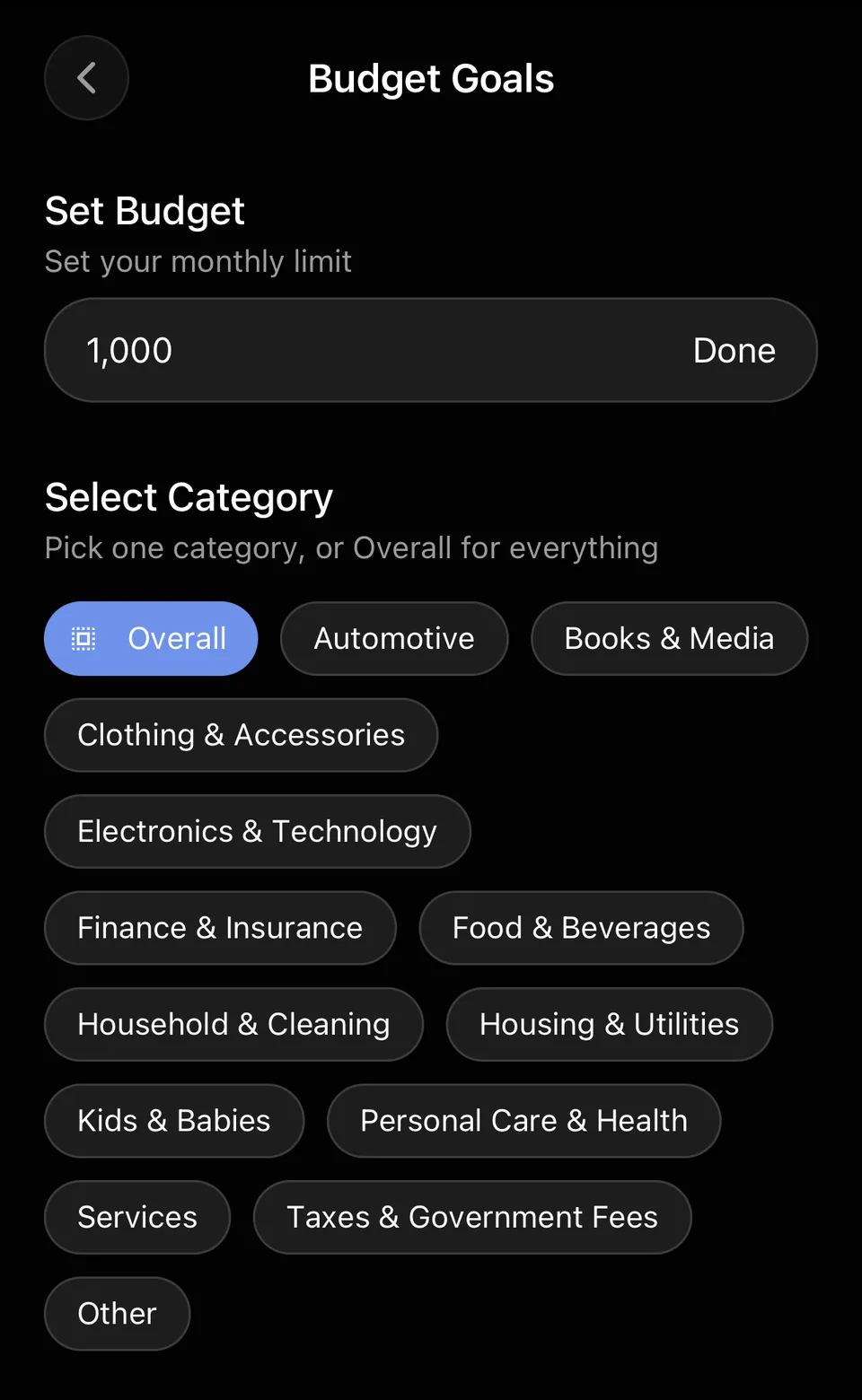
In the Available per day row, tap Set Budget. The Budget Goals form opens.
Check the amount
The amount is already filled in: last month's Overall budget if you had one, otherwise last month's spending, rounded. If there's neither, the field is empty. Change the amount if you like, and check that Overall is selected under Select Category.
Tap Done
Tap Done at the right end of the amount field. You're back on Home, and the row now shows an amount.
Good to know
The budget belongs to one month and doesn't carry over. On the 1st of a new month the row shows Set Budget again, and the form opens with last month's amount filled in, so renewing it takes two taps: the link, then Done. To change this month's budget, tap the Available per day row itself. Category goals are covered in how to set a monthly budget by category.
How to use the two numbers to cut back
Read the two numbers together. Average per day is the pace you've kept so far; Available per day is the pace your budget can still afford. From the 7th day of the month, the line under the amount does the subtraction for you: a minus means you need to spend that much less per day than you have so far, a plus means you have room to spare. Early in the month, when a few days don't say much yet, compare with the last-month row instead: it's the pace of a whole month.
- Save receipts the same day. The average only knows the receipts you've saved, by purchase date. If you add a week's receipts late, it reads low until you catch up.
- Tick off bills when you pay them. A bill you've paid but not ticked stays reserved, and once it's overdue it is still set aside the following month. Ticking a bill with a fixed amount doesn't change Available per day by itself: the amount just moves from reserved to spent. See how to mark a bill paid.
- Look at the days. Tap the card to open the Calendar for that month and see which days pushed the average up. How to read the money calendar explains that screen.
When a row is missing or looks different
- A past month is selected. You see only Average per day, that month's purchases divided by all its days, plus the purchases only tag if it had bill payments. A future month shows no card.
- A filter is on. With Personal, Household or Business, the averages follow the filter and the Available per day part is hidden. Switch back to All Receipts to see it.
- There's no card. It has nothing to show yet: no purchases in the month, no Overall budget and no figure for last month. Save a receipt and the card appears. Just starting out? See how to add your first receipt.
- It's the month you created your account. The days are counted from your first purchase of that month (unless you're in a household), so a late start isn't divided by empty days. The month after, it shows up as the last-month row only if at least 7 of its days were counted.
- You're in a household. The spending is everyone's, like every total on Home, while the budget is your own.
- Whole amounts or decimals. When every per-day amount on the card is 0 or at least 100, the card drops the decimals; otherwise every row keeps them, as in €23.44. The reserved amount keeps the currency's usual decimals. Currencies without decimals, such as the yen, show whole amounts everywhere on the card.
- Still no card? Update ReceiptStorm to the latest version.
See your own spending, item by item
ReceiptStorm is free to download for iPhone and Android.



Frequently asked questions
How is the average per day calculated?
ReceiptStorm divides the month's purchases, without bill payments, by the calendar days of the month so far, today included. Days without spending count too. For a past month it divides by all the days of that month.
Why aren't my bills in the average?
A bill such as rent lands on one day and would distort the daily figure for the whole month. Bills still count in Money spent this month, and unpaid ones are set aside when Available per day is worked out.
Why is Available per day lower than my remaining budget divided by the days left?
Because the unpaid bills that count in your spending are subtracted first. The line under the amount shows how much is reserved for them.
Why does the row say Set Budget again this month?
A budget belongs to one month and doesn't carry over. Tap Set Budget: last month's amount is already filled in, so you only have to tap Done.
Does ReceiptStorm alert me when I spend more than the daily amount?
No. There are no notifications or warnings for the daily amount. Open Home and check the card.
Is the Average per day card free?
Yes. The card and the budget behind Available per day work on every plan: Free, Pro and Ultra.